

17 min read
.png)
Public sector teams don't usually struggle because they lack effort. They struggle because too many important processes still live in separate systems, separate spreadsheets, separate inboxes, and separate departments.
Payroll's in one place. Accounting's in another. Utility billing may have its own database. Timekeeping sits with a third-party tool. Meter reads come in from another source. Payment data shows up somewhere else. And reporting often gets patched together in Excel.
So your team ends up doing what public sector teams have done for years: rekeying data, reconciling by hand (or ruler), double-checking exports, and hoping nothing gets lost between systems.
That's exactly why integration matters. And not just with any systems, though; integration with the best local government software.
Modern public sector software is supposed to reduce friction, not create more of it. The ICMA has noted that modern government platforms should be built with open architecture and standard interfaces so organizations can use new applications alongside existing ones, phase in change over time, and get easier access to usable data and reporting.
And process improvement experts writing for Smart Cities Dive make a point from the operations side: agencies should examine workflows across budgets, payroll and HR, vendor payments, procurement, cash receipts, and audit data to identify where handoffs and delays are dragging performance down.
And for finance directors, payroll and HR leaders, utility billing directors, IT leaders, city managers, and library accountants, integrating the best public software in the industry can be a game-changer.
But you can really only do that with the best. Anything subpar will drag you down.
But what is the best software? How can you tell it's the best?
Well, this is a technology question. But it's also a workflow question, a visibility question, and a customer service question.
The best local government software is not only about the quality and features of the software, but it is about the support you get from the vendor's customer service team, the collaboration with vendor employees, the quality and flexibility of the software training and implementation, the customer community and partnerships, and the integration capabilities offered.
So with that in mind, let's dig into why integrating the best ERP systems for the public sector is a game-changer.
What does “ERP integration” actually mean?
“ERP integration” sounds technical, but the idea is simple: it means your systems can exchange data and work together instead of forcing people to do that work manually.
One Integration company defines it as connecting multiple applications or systems so they can share data and work together seamlessly. It also explains that integration can happen through APIs, middleware, connectors, and other methods that let systems exchange data and communicate effectively.
In plain English, ERP integration usually takes one of these forms:
-
API integration. An API lets two systems communicate directly. Data can move more quickly, with less manual intervention, and often with tighter process control. APIs are powerful, but they require intentional development and maintenance. At SSI, APIs are typically built with partners rather than with every outside system under the sun. We only API with the best.
-
File import/export. This is still one of the quickest, most practical, and most common methods in public sector environments. One system exports a file, often CSV, Excel, or another structured format, and another system imports it. It is not as flashy as an API, but it can be reliable, efficient, and perfectly appropriate, depending on the workflow. We often use this method for partner integration, too; we make sure the export files are perfect for upload to a partner system, and vice versa.
-
File exchange interfaces. These are more structured than ad hoc exports. They are often used on a recurring basis between two systems that need predictable movement of timecards, payroll data, meter files, or other operational data.
-
Direct data exchange or custom methods. Some integrations rely on custom-built workflows or partner-supported interfaces tailored to a particular use case.
-
Manual export for use elsewhere. This still counts as part of an integration strategy when the goal is to get good data out of your ERP so it can be imported into another approved system.
These distinctions matter. Because when you ask, “Does it integrate?” what you often mean is, “Can my team stop retyping the same information in three places?” The answer does not always have to be a live API. Sometimes a well-designed import/export workflow gets the job done beautifully.
Why does integration matter so much in the public sector?
In the private sector, disconnected systems are simply annoying. In the public sector, they can be expensive, risky, and deeply frustrating.
Smart Cities Dive points out that improvement efforts should look closely at budgets, payroll and HR systems, vendor payments, procurement workflows, and cash flow because that is where agencies often find delays, messy handoffs, and avoidable inefficiencies.
And the National League of Cities has argued that future-ready cities need a “technology confluence” that eliminates silos and builds connected systems that better serve stakeholders across generations.
That translates into some very practical benefits:
-
When payroll integrates with timekeeping, your payroll team spends less time fixing inputs.
-
When accounting connects with budgeting and analytics, finance leaders can move from reactive decisions to proactive ones.
-
When utility billing connects with meter systems, payment tools, and accounting, the meter-to-cash process gets tighter and less manual.
-
When resident-facing tools connect to internal workflows, staff don't waste time transcribing requests from paper, email, or voicemail.
-
When reporting tools can pull from the right data, decision-makers spend less time hunting and more time leading.
And, maybe most importantly, integrated systems reduce the hidden tax of manual work. The rekeying. The cross-checking. The spreadsheet creation.
Government teams are busy enough already! So integration allows them to be more efficient with their valuable time.
.png?width=2076&height=360&name=Banners%20(13).png)
What public sector integrations are most common?
In local government and public utilities, the most common integrations are the ones that save staff time, cut duplicate entry, improve reporting, and help departments stop working like separate entities.
A few show up again and again.
Timekeeping and payroll are one of the biggest. Hours worked, leave balances, approvals, and labor data need to move cleanly into payroll. If they don't, staff are stuck reconciling files, fixing errors, and babysitting imports.
HR, benefits, and employee self-service are another common area. Enrollment data, payroll deductions, employee changes, and self-service access all relate.
Accounting, budgeting, and analytics are also core. Public sector organizations need financial data to move into tools that support forecasting, visual reporting, transparency, and decision-making.
Meter reading and utility billing are another major category. Modern utility billing platforms need to bring together meter data, customer accounts, payments, and reporting.
Our utility billing FAQ blog post explains that transformative utility billing software should handle automated meter data management, CRM, payment processing, and reporting in one integrated environment. That's especially important for utilities dealing with AMR or AMI data, route management, billing cycles, customer service, and collections.
Payment portals and cash receipt workflows matter, too. Online payments, AutoPay, card processing, lockbox processing, and customer portals all touch utility operations and accounting... When those pieces connect cleanly, payments post faster, staff spend less time manually reconciling transactions, and customers get a better experience. Modern payment portal systems should support multiple payment methods, reconcile payments, and integrate with accounting systems.
GIS, field work, and work orders are increasingly common, especially for utilities and local governments managing assets in the field. GIS-linked work orders, mobile inspections, and field service updates all reduce duplicate data entry and improve visibility.
Operational portals and resident-facing workflows are another common integration area. Permits, licensing, requests, records, and service forms often need to tie back to internal workflows, payments, and reporting.
Reporting, analytics, and Excel-based data exchange may be the least glamorous integration category (or the most glamorous, depending on who you talk to...), but it's one of the most important. Because at the end of the day, leaders need answers. They need data that is usable, exportable, drillable, and timely. Not trapped in a system that only one person knows how to navigate.
The ICMA article entitled "7 Things to Look for in Your Next Local Government Software Provider" specifically calls out data accessibility and integrated reporting as essential traits of modern platforms.
This is a big reason why VIP Accounting, Payroll, and Utility Billing are built in the same system and format. Data is shared between the systems seamlessly. This helps you keep track of and find exactly what you're looking for when you need it.
Real-world case studies and signs that integration works
You can usually tell an integration strategy is working when the story stops being about software and starts being about outcomes.
-
It looks like fewer spreadsheets.
-
It looks like fewer duplicate entries.
-
It looks like faster payroll processing.
-
It looks like cleaner reconciliation.
-
It looks like fewer calls asking, “Which system has the right number?”
-
It looks like leaders being able to drill down into current data instead of waiting for someone to stitch together a report.
It looks like this:
-
A benefits administrator who no longer spends a week cleaning up open enrollment data.
-
A public utility that can bring in meter data, manage customer accounts, reconcile payments, and improve reporting in one connected environment.
-
A city that can collect digital fees and improve accounting and service delivery at the same time.
-
A government office that can finally stop living in paper, email, and one-off tools.
Muskingum Watershed Conservancy District significantly reduced processing time for utility billing, accounts payable, and streamlined workflows. And the integrated ERP systems provided real-time visibility into financial data and better vendor payment timelines, too.
Midpointe Library Systems benefited from the integrated VIP Accounting, VIP Asset Management, VIP Payroll, VIP Budgeting & Analytics, and VIP Cloud. The library reported back that processes that previously took a week now being completed in less than a day.
Bentek’s public sector case studies show some good examples. In Burleson, Texas, manual entry into multiple carrier systems and payroll created reconciliation work every month until the city used an integrated benefits approach that streamlined deductions and reduced post-enrollment work from a week to a day.
In Beaumont, Texas, a lack of payroll integration had led to extensive manual entry and higher error risk, while Bentek’s payroll integration reduced some processes to less than 30 minutes.
And ClearGov’s case studies show how finance data becomes more useful when it is presented in accessible dashboards that leaders and residents can actually understand. With ClearGov, the Town of Palm Beach, Florida's fragmented reporting became a “unified, automated reporting workflow,” with all financial data in one platform, real-time updates, and one change populating in multiple systems automatically. They reduced their financial reporting time from 3 months to 6 weeks.
And Hudson, Colorado moved from disconnected spreadsheets and Word documents to “one connected system,” with fewer inconsistencies, less duplication, and better collaboration across departments.
In Cherry Hill, New Jersey, GovPilot (formerly SDL) connected 10 departments in one platform. This gave staff a comprehensive property history across departments, while mobile tools let field personnel access information on-site and sync activity back to other platforms.
Atlantic City, New Jersey's GovPilot deployment helped improve reporting, response times, and digital payment collection across many modules. Its digital forms, online payments, and cross-department modules improved completion rates and accounting accuracy, too. They were able to double the amount of record requests they could process in a week.
Polimorphic's integrated workflows helped Bayside, Wisconsin tackle permit applications and citizen calls, saving them 116 hours per year (3 work weeks). And in Tangent, Oregon, Polimorphic centralized citizen interaction records and code enforcement processes, which improved service response times and reporting.
In Riverside, Ohio, they coupled ClearGov's budgeting and transparency tools with SSI's VIP Budgeting & Analytics to provide their citizens with detailed project information. And with the rest of the VIP Suite, they were able to complete year-end reporting in under 30 minutes.
That's why integration is a game-changer. Not because it is trendy. But because it removes friction from the work your people do every day
What Integrations does VIP software offer?
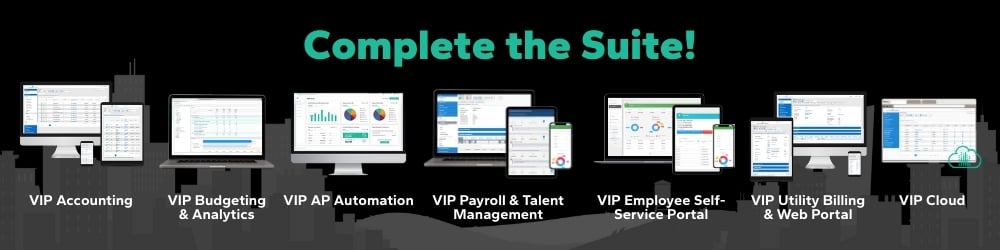
The entire VIP Suite is integrated via API. VIP Accounting, VIP Payroll, VIP Utility Billing, VIP Budgeting & Analytics, VIP Talent Management, VIP Employee Portal, and VIP AP Automation. They are all connected.
VIP Employee Portal, VIP Payroll, and VIP Talent Management are all integrated to display instant changes and give employees the ability to enter hours and view vital information (like W-2's), keep track of the customer journey and time-off, and link payroll to benefits and withholdings.
VIP Utility Billing is integrated with VIP Accounting, VIP Budgeting & Analytics, modern payment platforms, and metering systems so that accounts, deliquencies, billing, and forecasting all work together. And the work orders feature connects with VIP Mobile, so work orders can be initiated in the office or in the field.
External integrations we offer depends on the system. SSI typically uses import/export or direct API approaches, but usually only with partners.
Right now, we focus on best-in-class accounting, payroll, and utility billing software. But our partners fill in the gaps with their best-in-class public sector software:
-
Right Stuff Software supports timekeeping and scheduling workflows tied to VIP Payroll.
-
ClearGov supports government transparency, budgeting, Annual Comprehensive Financial Reports, and financial storytelling that connects to data from VIP Accounting.
-
GovPilot supports permitting, licensing, code enforcement, digital forms, payments, government websites, and operational workflows that connect to the VIP suite.
-
Bennett & Williams supports GIS-related mapping and asset-oriented needs connected to VIP Utility Billing.
-
Bentek supports benefits administration connected to employee processes and VIP Payroll.
-
Polimorphic supports AI-powered search, CRM, multilingual assistance, resident information access, and workflows connected to VIP.
This partner ecosystem is part of what makes integration valuable. Because local governments rarely need a single tool to do literally everything. But you need the best systems to share the right data, in the right way, at the right time.
Can VIP integrate with other systems I use?
In some cases, yes. But the honest answer is a little more nuanced than a blanket that, because the method depends on the system and the use case.
You obviously get to choose the software you use. And we will support it as best we can by allowing exports and imports. But we've also vetted our partners to make sure they are up to our standards; not just with their software, but with their customer service. So our integrations with them are more detailed, and sometimes API-level. We've chosen to integrate with the best local government software systems in the industry.
So while we do the best to support your software choices, just be aware that we have curated our partnerships to be of most benefit to you. And we might not integrate with just anyone.
Can I import and export data from Excel or other financial systems into VIP?
Yes.
And for a lot of public sector organizations, this may be the most reassuring answer in the whole article.
VIP supports import and export through Excel, CSV, and other file-based methods. That means data can be brought in from legacy financial systems or external systems into VIP, and data from VIP can be exported for use in other systems.
That is especially important for organizations that are modernizing in stages. Maybe you're replacing one legacy system now, but not everything at once. Maybe you need historical financial data loaded into a new environment. Maybe you have a reporting tool, transparency platform, or operational system that still depends on exports. Maybe the real goal is simply to stop retyping the same information every month.
All of that is still progress.
And there is a real public-sector case for making data more usable. An article by the University of Michgan argues that digital, standardized financial data is more searchable, comparable, and useful than locked or static reporting formats. While the scholarly paper focuses on broader financial reporting, the principle applies here too: data is more valuable when it can move, be analyzed, and be used.
That's also why import/export is sometimes the best answer. Reliable file-based movement can be simpler to maintain, easier to validate, and more practical for public agencies than an underengineered live connection.
The bottom line
You don't need more disconnected tools. You need connected operations.
That doesn't always mean a live API for everything. Sometimes the best answer is a direct integration. Sometimes it is a file exchange interface. Sometimes it is structured import/export. Sometimes it is a phased rollout with trusted partners. The right answer depends on your company, your process, the systems involved, and the outcomes you need.
But the goal stays the same: better data flow, less manual work, fewer silos, and clearer visibility across payroll, accounting, utility billing, and the many other systems your team depends on.
In other words, integration doesn't have to be a giant headache. It can be a practical path to making your office run better.
And that's really what we all want.
Or check out our case studies...
Related Posts
New Partnership with Bentek, a Trusted Benefits Administration Platform
If you’re juggling HR, payroll, and benefits responsibilities in the public sector, you know how...
City of Nevada, MO Joins the SSI Family!
We’re excited to welcome the City of Nevada, MO to the SSI family! Located in southwest Missouri,...
The Village of Sugar Grove Joins the SSI Family!
Tucked into the heart of Fairfield County, the Village of Sugar Grove is exactly what its name...