

11 min read
.png)
It's a Wednesday afternoon. Somewhere in the office, a stack of paper time slips is making its way from one desk to another. A department head is on the phone trying to figure out whether they have budget left for a purchase they need to approve by Friday. An employee just emailed the finance office to ask (again) for a copy of last year's W-2.
And the finance team is doing what public-sector finance teams everywhere have learned to do: making the legacy system work, even when it isn't really working.
McDonough County, Illinois knew that feeling well.
For years, the County's finance and payroll operations ran on a legacy ERP system that was getting harder to live with every budget cycle.
The workflows worked (sort of). The reports came out (eventually). The audits got done (with a lot of effort).
But the cost of "sort of, eventually, with a lot of effort" adds up over time. It shows up in late nights during year-end. It shows up in the binder of manual workarounds every new hire has to learn. It shows up in the things a small finance team can't get to, because they're too busy keeping the system fed.
So McDonough County made a decision. They're moving to VIP, and they're using the transition to clean up some things that have needed cleaning up for a while.
Stick around. We're going to talk about what was getting in the way and what their next chapter will look like.
.png?width=1000&height=250&name=Support%20Site%20Banners%20(10).png)
What Was Getting in the Way?
When you talk to a finance team about a legacy ERP, you don't usually hear about one big problem. You hear about a dozen small ones that compound.
In McDonough County's case, those small problems clustered into a few familiar things. Let's talk about 10.
Payroll that ate up time
Payroll was heavily manual. Accruals weren't tracked automatically, which meant leave balances took real effort to reconcile and personnel costs took real effort to understand.
Every pay period had a tail of follow-up questions from employees about hours, time-off, and balances that didn't quite match what they thought they should.
And every minute spent answering those questions was a minute not spent on something else.
Employees without access
If an employee in McDonough County wanted a paystub, a W-2, or a quick update to their personal information, they couldn't just log in and get it. They had to ask. Which meant somebody in the office had to stop what they were doing and respond.
It's a small thing on any single day. Across a year, it's a lot of small things.
PTO tracking by spreadsheet and memory
Time off and accruals were tracked by hand. That meant the people who actually owned a leave balance (the employees themselves) had limited visibility into it. Administrators were the only ones who knew, and even they were working off systems that didn't talk to each other.
Manual tracking is fine when nothing changes. But things always change.
Purchasing on paper
Purchasing was centralized, paper-heavy, and slow. Requests moved through the building physically. Approvals got stalled. Accountability was hard to trace. And when two departments accidentally ordered the same thing, or when a payment slipped through the cracks, the trail back to what happened was a long one.
Departments flying blind
Department heads didn't have real-time access to their own financial data. To know where they stood on their budget, they had to ask. Which meant leadership was making decisions on numbers that were almost current. They were usually accurate, sometimes not, but always one step behind reality.
You can't manage what you can't see.
Two systems, twice the typing
The systems weren't well integrated. So the same information got entered in multiple places. Payroll here, accounting there, a spreadsheet somewhere in the middle. Every duplicate entry was a chance for a small error to become a big one.
Inefficient budgeting
Budget preparation was manual and unstructured. No real workflow, no easy way for departments to collaborate, no central place where the latest version lived. Just spreadsheets, emails, meetings, more spreadsheets.
And once the budget was set? Reporting on it in real time was its own challenge. Stakeholders, residents, the County Board, and department heads didn't have an easy way to see where things stood.
Grants and projects in the gaps
Grant and project tracking didn't live cleanly in any one system. Which is exactly the kind of gap that creates compliance risk. When funding has rules attached, and the rules live in someone's head or in a folder on someone's drive, things slip.
Audits that ran on willpower
Compliance and audit reporting required significant manual effort. Audit season meant late nights, side-by-side comparisons, and a lot of double-checking.
The reports got done. They always do. But the cost of getting them done was real.
Reports couldn't answer
The County's existing reporting tools were inflexible. Which meant when leadership asked a new question (a trend, a comparison, a what-if?), the answer was rarely a few clicks away. More often, it was a full-fledged project.
What Software did McDonough County, IL Purchase?
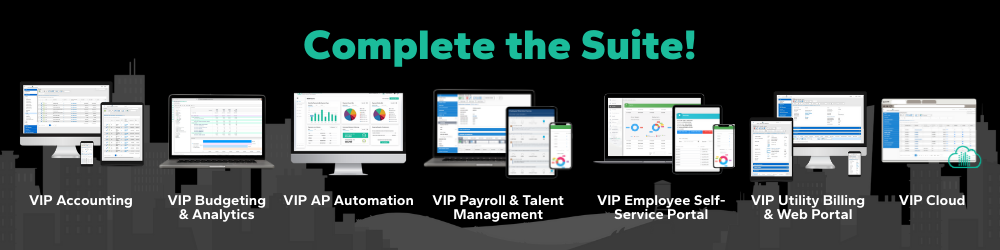
In short, they are investing in almost the entire VIP Suite:
VIP Accounting
The general ledger, AP, AR, purchasing, and the whole financial backbone.
This is the piece that ends the double-entry problem. When accounting, payroll, and budgeting all view the same data, the duplicate issue goes away. So do the small reconciliation errors that come with it.
For purchasing specifically, VIP moves the workflow out of the paper-and-walk-it-around era. Requisitions, approvals, encumbrance tracking, and PO management all live in one place, with audit trails on every step.
Departments get accountability. Finance gets fewer surprise invoices.
VIP Budgeting & Analytics
This is where the budget process stops being a months-long group project. Departments enter their own requests. Workflow routes them. Leadership reviews them. Versions are tracked. The whole thing is a workflow, not a scavenger hunt.
The analytics side is the other half of the gift: real-time visibility into financial data for departments and leadership. Spending dashboards. Budget-to-actuals at a glance. The kind of access that means a department head can answer their own question without filing a ticket with finance.
VIP Payroll & HR
Automated accrual tracking. Integrated time and leave. Payroll that connects directly to the general ledger, so the personnel-cost picture is current and accurate, not reconstructed at month-end.
For the payroll team, this is the difference between processing a pay period immediately and spending 3 days processing a pay period.
The accrual math runs in the background. The leave balances stay current. And no more questions from employees to the finance office.
VIP Employee Portal
Employees log in and get their paystubs, their W-2s, their personal information, and their leave balances. Self-service for the things that don't need a human in the loop.
The administrative load on the finance office drops. The wait time for employees drops. Everybody wins.
VIP Cloud
The whole thing is hosted, secured, and maintained. No on-prem server to babysit. No after-hours patching. No worrying about whether the disaster recovery plan would actually work if you had to use it.
For a county finance team that doesn't have a large IT staff to dedicate to ERP infrastructure, this matters a lot.
And one more thing...
There's a piece of this project that doesn't show up on the module list, but it's worth naming.
McDonough County is also doing a Chart of Accounts renumbering as part of the transition.
If you've never done a COA renumbering, here's the short version: the chart of accounts is the spine of an ERP.
Every transaction lives on it. Over years and decades, charts of accounts accumulate. New funds get added. Old ones go inactive but never go away.
Account numbers stop following a pattern, because the pattern outgrew itself two reorganizations ago. The whole thing becomes a kind of archeological record (and without the good kind of fossils).
Some counties never clean it up. The thought of doing it inside their existing system is overwhelming, and the risk of breaking something feels too high.
But moving to a new ERP is the one moment when a COA renumbering actually makes sense. The data is being migrated anyway. The team is already learning new workflows. The clean break creates the opportunity for an actual clean break.
When the County goes live on VIP, they'll be on a chart of accounts that's been thought through, simplified, and organized for the way the County actually operates today—not the way it used to.
It's a one-time investment that pays off every audit, every budget cycle, and every grant report for the next twenty years.
What Good Processes Actually Look Like
You don't have to be in the middle of an ERP transition to benefit from thinking about this.
If you're a public-sector finance team running on a legacy system right now, here are five things you can do this week, regardless of where you are on the buying journey.
-
Document every manual workaround. Every spreadsheet, every paper form, every "we just always do it this way"... write it down. You'll want this list when you start evaluating new systems. And you'll be surprised how long it gets.
-
Ask your department heads what they can't see. The gap between what leadership knows and what they wish they knew is usually where a budgeting and analytics tool earns its keep. Make a list of the questions they ask finance most often.
-
Track how many employee questions hit your finance office in a week. Paystub requests, W-2 questions, leave balance questions. Count them. If the number surprises you, an employee self-service portal might be the highest-ROI move you can make.
-
Look at your chart of accounts with fresh eyes. Are there account numbers nobody knows the history of? Funds that exist on paper but haven't moved in five years? You don't have to fix it right now. But noticing it is step one.
-
Talk to a county or city that's been through the transition. Not a vendor demo. An actual peer, in actual operations, on the other side of go-live. Their answer to "what would you do differently?" is worth more than any sales deck.
The Short of It
McDonough County is not unique. Every line item in the list above (manual payroll, no self-service, paper purchasing, blind departments, disconnected systems, painful audits) shows up in finance offices across the country.
What's different is the decision to do something about it.
Public-sector finance is important.
Payroll runs so County employees can pay their bills. Purchasing runs so the County can actually do its job—keep the roads up, keep the courts running, keep services available to residents. The general ledger runs so taxpayers can trust that public funds are handled with care.
The workarounds are not your job. They're the cost of a system that isn't doing its job.
McDonough County made the switch because their team and their residents deserve better. And so do yours.
So when you're ready to see what that looks like in practice, we'd love to show you. No pressure. Just a conversation about where you are and where you want to be.
Ready to see how VIP can help your office? Let's talk.
Or take a look at our on-demand webinars...
Related Posts
Call for Speakers for 2026 Impact Conference
You’re invited to take the stage at 2026 SSI Impact Conference, our annual user conference where...
What's Changing in the Ohio Police and Fire Pension Fund?
OP&F is preparing employers for a tentative October 2026 transition to its new pension...
Software Solutions Joins GovRAMP
Local governments are facing the reality that cyber threats keep rising, compliance demands keep...